
Field Force Management for Healthcare: How SurgyField Makes Every Referral Visit Countable
Most field-force tools can tell you a rep showed up. SurgyField, the field-sales module inside SurgyCRM, tells you whether the visit produced a lead, a referral, and revenue — with GPS-verified breadcrumb history and on-the-spot lead capture.


Key takeaways
- Generic field-force trackers answer 'did the rep visit?'; healthcare growth teams need 'what revenue did that visit produce?'
- SurgyField pairs a native mobile app for reps with the SurgyCRM backend, so referral relationships, visits and attributed revenue live on one record.
- Referral revenue is lost most often at the handover — a visit that generates interest but no tracked patient record earns nothing.
- Getting a field team live is a configuration exercise, not an integration project: partners, territories, visit types and attribution rules.
A field rep is supposed to visit three referring clinics today. Did they actually go? How long were they there? Did the visit produce a lead, a referral, or nothing at all? Most field-force tracking tools can answer the first question. SurgyField — the field-sales module built into SurgyCRM — is built to answer all three, and to make sure the revenue a visit generates never gets forgotten the moment the rep gets back in the car.
The question every healthcare growth team eventually asks
Every hospital, diagnostic chain, or specialty clinic that grows past a handful of referring doctors ends up asking some version of the same question: our field team says they’re out visiting partners all day — how do we actually know?
It’s not a question born of distrust. It’s a question born of the fact that field business development in healthcare — visiting referring physicians, partner clinics, corporate wellness tie-ups, insurance desks — happens almost entirely outside the four walls of any office, on a schedule nobody in the office can see in real time. A manager can ask for an end-of-day report, and most reps will file one. But a report says what a rep remembers doing, filtered through however much detail they felt like typing at 7 p.m. It doesn’t say where they actually were, how long they were actually there, or whether the visit actually produced anything for the pipeline.
That gap — between “reported activity” and “verified, revenue-attributed activity” — is exactly what field force management software exists to close. The only real debate left in the category is how far a given tool closes it.
What a generic field-force tracker gets you
India’s field-force management market is mature and genuinely useful. Platforms built for pharma and FMCG field teams — names like TrackoField, SalaryBox, Lystloc, and ConnectMyWorld are among the most established — solve the accountability half of the problem well. The pattern across this category is consistent: a mobile app for the rep, GPS-based punch-in and geofenced attendance, a live map for the manager, beat-plan or route tools, and a report at the end of the day showing who went where and for how long.
For a field force whose entire job is “prove you visited the outlet,” that’s often enough. But healthcare business development is rarely just “prove the visit happened.” A hospital’s field rep visiting a referring gynecologist isn’t clocking a delivery stop — they’re maintaining a relationship that, if it goes well, turns into a referred patient, a signed partnership, or a new corporate tie-up worth lakhs in annual patient volume. A tool that confirms the rep’s GPS pin was inside a 100-meter radius of the clinic at 2:47 p.m. has told you the visit happened. It has told you nothing about whether the visit mattered.
This is the gap SurgyField is built to close, because — unlike a standalone field-tracking app — it isn’t bolted onto a separate system from your Leads, Referrals, and Patient Journey data. It’s the same backend. A visit isn’t just a GPS ping; it’s a verified event that can produce a lead, a referral, or a follow-up task, all inside the CRM your coordinators and administrators already live in every day.
The revenue case, in numbers
The stakes here are larger than most growth teams initially assume. Independent healthcare-operations research puts hospital revenue lost to referral and interaction leakage in a wide but consistently painful range — commonly cited figures put 10–30% of potential revenue lost to poor referral follow-through industry-wide, and some health-system studies attribute upward of 20% revenue loss specifically to inefficient referral processes, as patients who were referred simply end up receiving care somewhere else because nobody closed the loop in time.
A field team’s visits to referring doctors and partner clinics are precisely where that leakage either gets plugged or gets worse. A referral relationship that isn’t visited regularly goes quiet. A referral that is captured during a visit but never makes it into a coordinator’s queue the same day is a lead that ages, cools, and — per the same body of research on inquiry response times — loses a large share of its conversion odds the moment it sits for more than about an hour unattended. (The same follow-through gap shows up later in the revenue cycle, as our guide to reducing TPA claim rejections explains.) Field force management, done right, isn’t an HR-adjacent attendance tool. For a hospital’s business-development function, it’s directly load-bearing on the top line.
Two halves, one backend
SurgyField is built as two coordinated pieces sharing a single data layer: a web admin section inside SurgyCRM, for supervisors and administrators, and a native mobile app the field reps themselves carry. Nothing about the rep’s day-to-day experience requires them to log into a browser, and nothing about a supervisor’s oversight requires them to chase a rep for a manual update — both sides are reading and writing the same live data.
The dashboard and live map
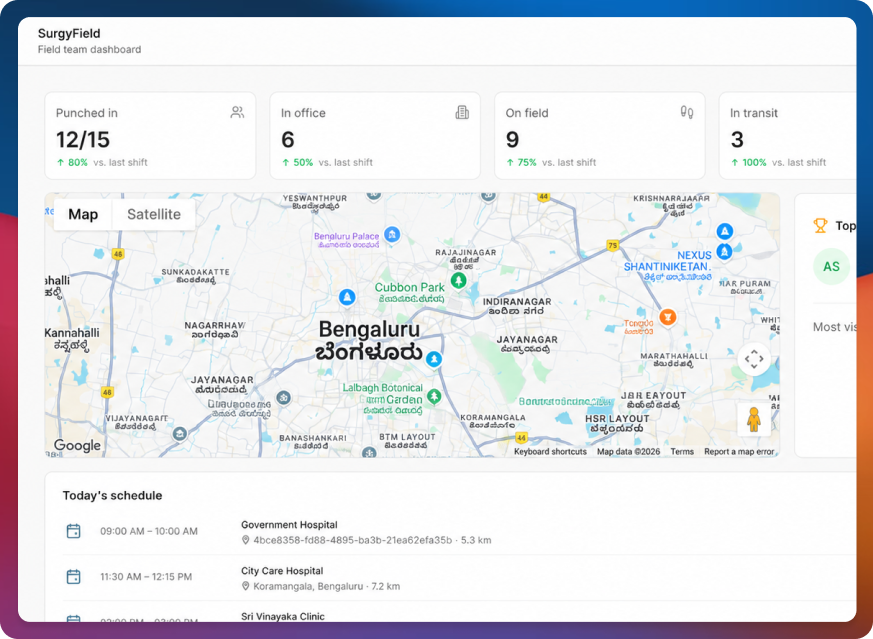
A supervisor opening the SurgyField dashboard gets an at-a-glance read on the entire team right now: duty-state stat cards (who’s punched in, who’s out on the road, who’s still in the office), a live map, a “Top performer” card, and today’s full schedule — all on one screen, with no need to call around asking where everyone is.
The live map plots every on-duty rep by current status — in office, in transit, in a meeting — color-coded, with a side panel listing everyone on duty and a one-tap link into any rep’s detail view. For a growth head managing a team spread across a city, or across several branches, this single view replaces what used to be a string of “where are you now?” messages sent throughout the day.
Breadcrumb history — the view teams actually ask for
Switching to History and picking a specific rep and day surfaces their complete breadcrumb trail — a pin-by-pin record of that day’s movement, a stats card totaling distance traveled, visit count, and office time, and a chronological timeline running from punch-in through every travel and visit event. This is deliberately the feature most comparable to a consumer vehicle-tracking view, because that’s the exact mental model most sales and BD leaders bring to the question “did they actually go?”
Two ways to read the same day are built in side by side: Travel View, which centers the map on the rep’s actual route, and Location View, which widens the frame to show the rep’s visited sites in the context of the surrounding area — useful when a manager wants to sanity-check territory coverage rather than trace a specific route.
Teams, agents, schedule, and reports
Running a field program day to day means more than watching a live map — it means managing rosters, planning visits ahead of time, and reviewing performance on a cadence. SurgyField’s admin side covers all four:
- Teams — create and edit field Teams, each with one designated lead, kept intentionally separate from the ticketing module’s Departments, because a field rep’s reporting line and a patient-complaint handler’s queue are two different organizational structures that shouldn’t be forced into one model.
- Agents — the full roster, with punch status, a productivity percentage, activity counts, and total distance traveled per rep, at a glance.
- Schedule — where planned visits are created ahead of time, each with a destination picked directly on a map and a geofence radius (100 meters by default) that auto-detects arrival, so a rep never has to manually declare “I’m here.”
- Reports — visit compliance percentage, average visits per day, and punctuality percentage across the whole team, the same set of numbers a growth head would want in a monthly business review.
The rep’s-eye view: what actually happens on the ground
None of the above works unless the app in the rep’s own pocket is genuinely easy to use — because a field-tracking tool that reps quietly resent or route around produces worse data than no tool at all. SurgyField’s mobile app is built around a single mission-control home screen: a live map of the day so far, a Punch In/Out control, and today’s visits sectioned into Ongoing, Upcoming, and Completed.
Tapping into any visit shows its geofence radius and three one-tap actions: Call the contact directly, Navigate — which hands off to the rep’s own Google Maps app rather than trying to render a competing turn-by-turn experience — and Complete visit or Mark missed. Arrivals themselves are detected automatically via geofencing; there’s no manual “check in” button a rep has to remember to tap, which is exactly the kind of friction that causes reps to under-report in tools that require it.
The Schedule tab’s Calendar view rolls up any day, past or present, into a single Day Summary: total on-duty time, total distance traveled, and a merged, chronological feed running from punch-in through travel through every visit’s own activity log to punch-out. The rep’s own Analytics tab surfaces the same categories of numbers a supervisor sees in the web Reports view — punctuality score, a 7-day visit-completion chart, a 30-day attendance breakdown — scoped to just that one person, which turns the app from a monitoring tool into something a rep can use to track their own performance against their own targets.
The moment that actually matters
Here is the feature that separates SurgyField from a pure attendance-and-mileage tracker: during a visit, a rep can capture a new Lead and/or a Referral on the spot, directly from inside the visit screen. That entry writes into the exact same Leads and Referrals tables used everywhere else in SurgyCRM, tagged with source “SurgyField,” and linked back to the GPS-verified visit that produced it.
Walk through what that means in practice. A rep visits a referring orthopedic clinic, and the clinic mentions a patient they’d like to refer for a knee replacement consult. Instead of that conversation living only in the rep’s memory until an end-of-day report — or worse, not surviving until then at all — the rep opens the visit, logs the referral in under a minute, and it’s immediately visible to the coordinator responsible for that specialty, tagged with exactly which clinic, which rep, and which geo-verified visit produced it. A supervisor reviewing pipeline the next morning isn’t just seeing “a referral came in” — they can trace it back to a specific visit, on a specific day, at a specific location, which is precisely the audit trail that turns “trust me, I was there and it went well” into a data point a growth team can actually report on.
Never miss the revenue a visit already earned
Capturing the lead or referral at the point of the visit solves the first half of the problem. The second half is what happens afterward — because a referral that’s captured perfectly but then sits untouched for a week is functionally the same as a referral that was never captured at all.
This is where SurgyField’s data feeds directly into SurgyCRM’s follow-up task engine. A lead or referral captured during a field visit is subject to the same automatic safety net as every other inbound channel: if a Journey milestone tied to that lead stalls — no movement toward a scheduled consult, no progress on a pending procedure — a follow-up task is generated automatically, flagged with the revenue at stake, and assigned to the right coordinator, rather than waiting for someone to notice the silence on their own. A field team can be doing everything right — visiting the right clinics, logging every referral faithfully — and still lose the resulting revenue if nobody closes the loop three weeks later. Automatic follow-up tasks exist specifically so that a good field visit isn’t wasted by a quiet gap afterward.
Why “did they go?” is the wrong question to stop at
It’s worth returning to the question that opened this piece — our field team says they’re out visiting partners all day, how do we actually know? — because the honest answer most field-force tools give is a GPS pin and a timestamp. That’s a real and necessary answer. Geofenced, GPS-verified attendance genuinely solves the accountability problem that generic mileage logs and end-of-day text reports never could, and any healthcare organization running a field team without it is flying blind on the most basic layer of oversight.
But for a healthcare growth function specifically, “did they go” was always a proxy for the real question: did the visit produce anything, and did we follow up on it before it went cold? A field-force tool that stops at the GPS pin answers the proxy question well and the real question not at all. SurgyField is built to answer both, in one app, one dashboard, and one backend — because for a hospital’s business-development team, a visit that isn’t visible and a visit that doesn’t convert cost the organization in exactly the same currency: patients who went somewhere else.
Getting a team live
Onboarding a field team onto SurgyField doesn’t require a rollout project. A supervisor creates the Team and adds each rep from the web admin panel, sets the first day’s Schedule with each visit’s location pinned on a map, and each rep downloads the mobile app and signs in with credentials issued the same way every SurgyCRM user account is created — no separate provisioning system, no waiting on IT. From a rep’s very first punch-in, their day is visible on the live map, and from their very first logged visit, a captured lead or referral is already flowing into the same pipeline the rest of the organization works from.
One record, not four systems to reconcile
This is the real advantage over a standalone tracking app: a visit captured by SurgyField was never meant to end at the GPS pin. The referral it produces is triaged by the same Lead Management queue as every other channel, tracked through every milestone by Patient Journey Management once that referral is admitted, and — during their stay — covered by the same Patient Experience system that surfaces how the patient’s actual visit went. That closes the loop referring partners genuinely care about: not just “did you get my referral,” but “how did that patient’s experience turn out.” It’s the same wider pattern behind SurgyCRM as a whole — for a deeper look at how acquisition, journey, feedback, and field sales tie together across the entire platform, see Why Hospitals Need More Than a CRM: How SurgyCRM Closes the Gap Between Patient Acquisition and Lifetime Value. For the bigger picture, see how SurgyCRM fits into the AI-first hospital, our patient journey and growth platform guide, and the latest AI in healthcare statistics for 2026.
SurgyCRM is a hospital revenue and patient-experience platform, and SurgyField is its field-sales and visit-tracking module — built so that a referral partner visit isn’t just logged, it’s connected, end to end, to the lead it produces, the coordinator who follows up, and the revenue that depends on both happening on time.
Looking for the numbers? See the latest AI in healthcare statistics in our AI in healthcare statistics report.
Comparing vendors? Read our buyer's guide to hospital AI software
Written by
Zuhaib Ahmad Khan
Full Stack Developer — Flutter (iOS & Android), React, Node.js · Surgy Innovation Labs Private Limited
B.E., Computer Science & Engineering, JSSATE, Bengaluru
Zuhaib Ahmad Khan is a full-stack developer at Surgy Innovation Labs Private Limited, building AI-first healthcare products across Flutter (iOS & Android), React, and Node.js.
Connect on LinkedInKeep reading
More on Healthcare AI
Hand-picked next reads that build on this article, so you can go deeper before you decide.
- Healthcare AI
Hospital AI Budget 2027: Where to Invest and How to Choose
For hospital leaders setting 2027 AI budgets in India and the GCC: where to invest first, what to budget for, a quarter-by-quarter plan, nine weighted criteria, 20 RFP questions and an honest look at where SurgyOne fits.
17 min readRead article - Healthcare AI
Hospital CRM Systems Compared: Which Should You Choose?
A weighted 12-point benchmark, five approaches compared on 16 capabilities, and 12 named platforms with October 2026 prices and India/UAE hosting.
14 min readRead article - Healthcare AI
AI in Healthcare Statistics 2026: 100+ Data Points from Primary Sources
AI in healthcare statistics for 2026 from primary sources: hospital and doctor adoption, market size, barriers, FDA AI devices, AI scribes, patient trust, India and GCC.
18 min readRead article